

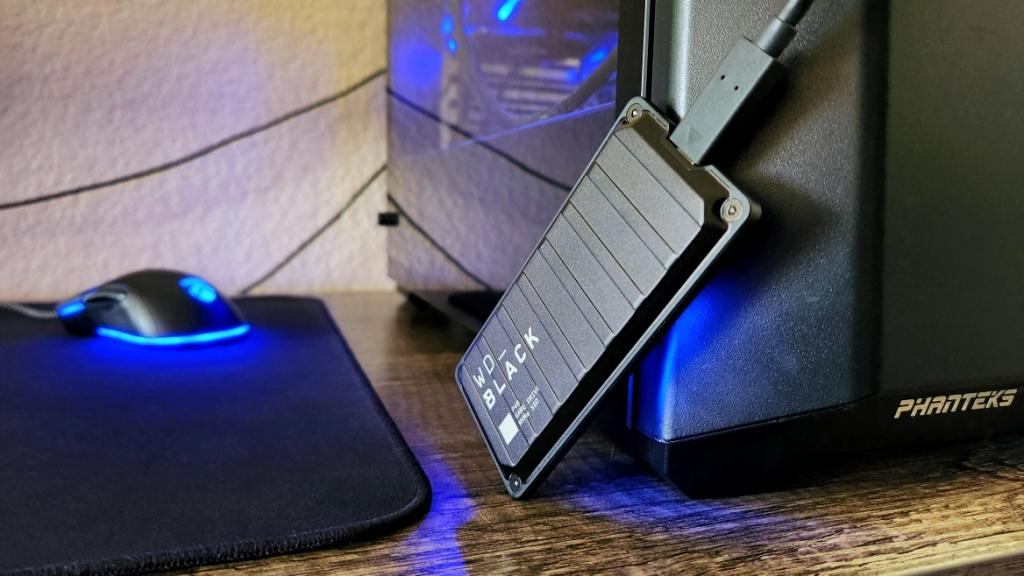
For gamers and content creators, fast and reliable storage is essential. Traditional hard drives may struggle with long load times and slow file transfers, making external SSDs a must-have for modern gaming and media storage. With high-speed read/write performance, compact design, and durability, external SSDs help you store games, videos, and large files without bottlenecks.
This guide explores the best external SSDs for gaming and storage, key specifications to consider, and tips to maximize performance.
Why Choose an External SSD for Gaming
External SSDs offer several advantages over HDDs:
-
Faster Load Times: SSDs dramatically reduce game loading screens and boot times.
-
Durability: No moving parts means better resistance to drops or shocks.
-
Portability: Compact and lightweight for gaming on the go.
-
Versatility: Can store games, software, videos, and large media files efficiently.
For serious gamers, pairing a high-performance external SSD with reliable internet and privacy tools, such as Best VPN for Streaming and Privacy Protection, ensures a smooth and secure online gaming experience.
Key Features to Look For
When selecting an external SSD for gaming and storage, pay attention to:
-
Read/Write Speeds:
-
Look for at least 500 MB/s for SATA SSDs.
-
NVMe SSDs can exceed 2,000 MB/s for ultra-fast transfers.
-
-
Capacity:
-
500GB–1TB is ideal for casual gaming.
-
2TB or more is recommended for large game libraries and media files.
-
-
Connectivity:
-
USB 3.2 or USB-C ensures faster data transfer.
-
Thunderbolt 3 or 4 offers maximum speed for NVMe SSDs.
-
-
Durability:
-
Shock-resistant and water-resistant models protect your data during travel.
-
-
Compatibility:
-
Ensure the SSD works with your PC, gaming console (PlayStation, Xbox), or Mac.
-
Top External SSDs for Gaming and Storage
1. Samsung T7 Portable SSD
-
Capacity: 500GB–2TB
-
Read/Write Speeds: Up to 1,050/1,000 MB/s
-
Features: Compact, AES 256-bit encryption, USB-C
-
Why It’s Great: Reliable, fast, and portable—perfect for gaming on the go
2. SanDisk Extreme Portable SSD V2
-
Capacity: 500GB–4TB
-
Read/Write Speeds: Up to 1,050/1,000 MB/s
-
Features: Rugged design, water and dust-resistant
-
Why It’s Great: Ideal for gamers who need durability and speed
3. WD My Passport SSD
-
Capacity: 500GB–2TB
-
Read/Write Speeds: Up to 1,050/1,000 MB/s
-
Features: Sleek design, password protection, USB-C
-
Why It’s Great: Combines style, speed, and security for gamers and creators
4. Seagate FireCuda Gaming SSD
-
Capacity: 500GB–2TB
-
Read/Write Speeds: Up to 2,000 MB/s
-
Features: RGB lighting, optimized for consoles, portable
-
Why It’s Great: Tailored for gaming enthusiasts seeking ultra-fast performance
5. Crucial X8 Portable SSD
-
Capacity: 500GB–2TB
-
Read/Write Speeds: Up to 1,050/1,000 MB/s
-
Features: Durable metal design, cross-platform compatibility
-
Why It’s Great: Offers high-speed storage at a competitive price
External SSD Comparison Table
| SSD Model | Capacity | Read/Write Speed | Key Features |
|---|---|---|---|
| Samsung T7 | 500GB–2TB | 1,050/1,000 MB/s | Compact, AES encryption |
| SanDisk Extreme V2 | 500GB–4TB | 1,050/1,000 MB/s | Rugged, water/dust-resistant |
| WD My Passport | 500GB–2TB | 1,050/1,000 MB/s | Sleek, password protection |
| Seagate FireCuda | 500GB–2TB | Up to 2,000 MB/s | RGB lighting, console-friendly |
| Crucial X8 | 500GB–2TB | 1,050/1,000 MB/s | Durable metal, cross-platform |
Tips for Maximizing Your External SSD Performance
-
Use the Right Port: Connect via USB-C or Thunderbolt for maximum speed.
-
Keep Firmware Updated: SSD manufacturers often release updates to improve stability.
-
Avoid Full Capacity: Leave at least 10–15% free space for optimal performance.
-
Regular Backups: Protect your data by backing up important files.
-
Enable TRIM Support: Helps maintain SSD speed over time.
Frequently Asked Questions (FAQs)
Q: Can external SSDs be used with gaming consoles?
Yes, most USB-C SSDs work with PlayStation and Xbox. Check console compatibility before purchase.
Q: Are NVMe SSDs significantly faster than SATA?
Yes, NVMe drives can be up to 3–5 times faster than SATA SSDs, reducing load times significantly.
Q: How durable are external SSDs?
Most are shock-resistant, with some models offering water and dust resistance for extra protection.
Q: Can I use an SSD for both storage and running games?
Absolutely. Many gamers install games directly on external SSDs for faster loading.
Q: Does size matter for portability?
Yes, smaller SSDs are easier to carry, but larger capacities are heavier and may require extra protection.
Final Thoughts
Choosing the best external SSD for gaming and storage ensures your games, media, and files are accessible quickly and securely. Whether you prioritize extreme speed, large capacity, or rugged portability, the right SSD can dramatically enhance your gaming experience.
Pairing a high-performance external SSD with secure internet practices, like using Best VPN for Streaming and Privacy Protection, ensures both speed and security in your gaming setup. With the right combination, you’ll enjoy faster load times, reliable storage, and peace of mind while gaming or working with large files.