


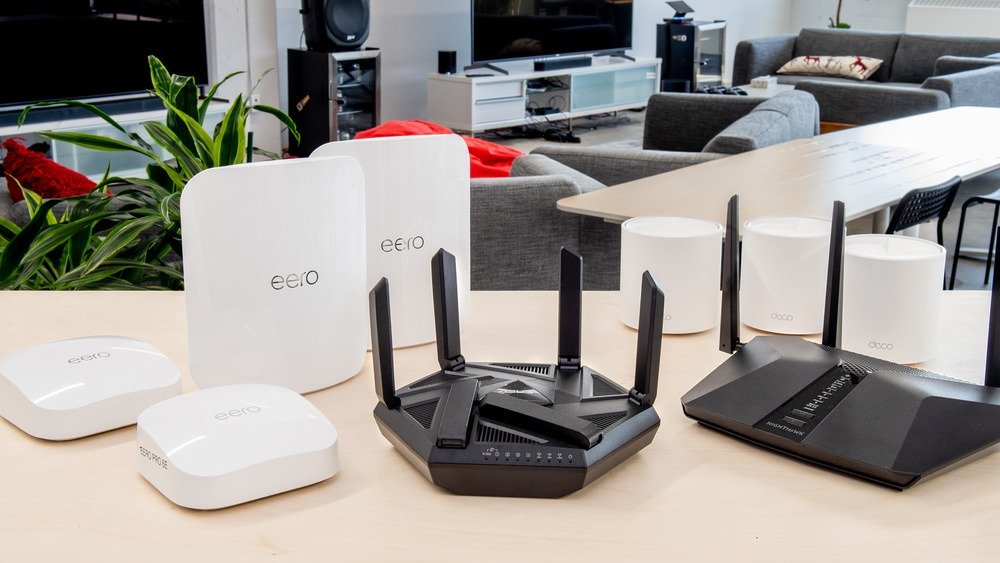
Reliable Wi-Fi is essential in today’s connected households, especially in large homes with multiple devices, smart home systems, and streaming services. Standard routers often struggle to provide consistent coverage across multiple floors or expansive layouts, resulting in dead zones, slow speeds, and dropped connections. Investing in a high-quality wireless router for large homes ensures fast, stable, and secure connectivity for every room.
This guide covers the features, benefits, top models, and best practices for selecting a wireless router suitable for large homes.
Why Standard Routers Often Fall Short in Large Homes
Large homes pose unique challenges for Wi-Fi coverage:
-
Multiple Floors: Wi-Fi signals weaken over distance and through walls or floors.
-
Numerous Devices: Streaming, gaming, smart home devices, and workstations create heavy traffic.
-
Interference: Microwaves, cordless phones, and neighboring networks can reduce signal quality.
-
Dead Zones: Some areas of the home may receive weak or no signal, affecting user experience.
A robust wireless router designed for large homes can address these challenges with advanced technology, wider coverage, and higher device capacity.
Key Features to Consider in a Wireless Router
| Feature | Description | Benefit for Large Homes |
|---|---|---|
| Wi-Fi Standard | Latest standards like Wi-Fi 6 or Wi-Fi 6E | Faster speeds, lower latency, better performance for multiple devices |
| Coverage Range | Signal reach in square feet | Ensures strong connectivity throughout the home |
| Mesh Capability | Supports multiple nodes for seamless coverage | Eliminates dead zones and provides consistent signal |
| Number of Bands | Dual-band or tri-band networks | Reduces congestion and improves performance |
| MU-MIMO Support | Multiple-User Multiple Input Multiple Output | Supports simultaneous connections without slowing down the network |
| Security Features | WPA3 encryption, firewall, guest network | Protects home network and connected devices |
| Quality of Service (QoS) | Prioritizes bandwidth for specific devices or apps | Optimizes gaming, streaming, and work tasks |
| Parental Controls | Manage access and screen time | Safe internet usage for children |
By prioritizing these features, homeowners can ensure a fast, reliable, and secure network that handles the demands of modern large households.
Top Wireless Routers for Large Homes
1. Netgear Nighthawk AX12
-
Strengths: Wi-Fi 6, tri-band, excellent coverage, robust security features
-
Best For: Tech-savvy users who want high-speed streaming and gaming across multiple devices
2. ASUS ZenWiFi AX (XT8)
-
Strengths: Mesh system, Wi-Fi 6, strong parental controls, user-friendly app
-
Best For: Homes needing seamless coverage with multiple floors or extended layouts
3. TP-Link Deco X90
-
Strengths: Tri-band mesh network, Wi-Fi 6, built-in antivirus protection
-
Best For: Families prioritizing both coverage and cybersecurity
4. Eero Pro 6
-
Strengths: Easy setup, Wi-Fi 6, reliable mesh coverage
-
Best For: Smart home enthusiasts with many connected devices
5. Linksys Velop MX10
-
Strengths: Dual-node mesh system, tri-band Wi-Fi 6, high-speed performance
-
Best For: Large homes requiring strong signal and minimal dead zones
Benefits of Using a High-Performance Router
1. Consistent Coverage Across the Home
Mesh networks and high-power routers ensure that every room receives strong Wi-Fi signals.
2. Improved Speed and Performance
Wi-Fi 6 routers handle more devices at faster speeds, reducing buffering and lag.
3. Enhanced Security
Advanced routers include features like WPA3 encryption, malware protection, and guest networks.
4. Better Smart Home Integration
Supports multiple IoT devices, including smart TVs, thermostats, security cameras, and voice assistants.
5. Simplified Network Management
Modern routers come with intuitive apps for monitoring devices, managing bandwidth, and setting parental controls.
Best Practices for Optimizing Wi-Fi in Large Homes
-
Strategic Placement: Place routers in central locations and elevated positions for optimal coverage.
-
Use Mesh Systems: For multi-story homes, mesh routers ensure seamless coverage without signal drop-offs.
-
Regular Firmware Updates: Keep router software updated to maintain security and performance.
-
Enable QoS: Prioritize bandwidth for work-from-home, gaming, or streaming applications.
-
Secure Your Network: Use strong passwords, WPA3 encryption, and guest networks to protect devices.
-
Reduce Interference: Avoid placing routers near thick walls, microwaves, or cordless phones.
Following these practices ensures a stable and fast network, supporting both daily usage and high-demand activities.
Common Mistakes Homeowners Make
-
Buying routers designed for small apartments instead of large homes.
-
Ignoring the benefits of mesh networks in multi-floor residences.
-
Overlooking firmware updates, leaving devices vulnerable.
-
Underestimating the number of connected devices and bandwidth requirements.
-
Failing to configure security features or guest networks.
Avoiding these mistakes ensures that your router performs at its best and protects your household network.
Integrating High-Speed Wi-Fi Into Daily Life
High-performance routers in large homes are not just for personal use. They support professional productivity for remote work, video conferences, and collaborative projects. Teams working from home can rely on strong, stable Wi-Fi, similar to how companies benefit from solutions like Best Project Management Software for Remote Tech Teams to coordinate efficiently across multiple locations. A robust network ensures seamless collaboration and uninterrupted workflow for both work and leisure.
Frequently Asked Questions (FAQs)
1. Do I need a mesh router for a large home?
Yes. Mesh systems provide seamless coverage across multiple floors, eliminating dead zones.
2. What is the difference between Wi-Fi 5 and Wi-Fi 6?
Wi-Fi 6 offers faster speeds, lower latency, better performance with many devices, and improved efficiency compared to Wi-Fi 5.
3. Can a router support multiple devices simultaneously?
Yes, routers with MU-MIMO and tri-band capabilities handle multiple devices without slowing the network.
4. How often should I update my router firmware?
Check for updates every few months or enable automatic updates to maintain security and performance.
5. Will a high-end router improve my internet speed?
It optimizes your home network performance but cannot exceed the speed provided by your internet service provider.
6. Are these routers suitable for gaming and streaming?
Yes. High-performance routers with QoS and Wi-Fi 6 are ideal for low-latency gaming and 4K streaming.
Conclusion
Choosing the right wireless router for a large home is essential for consistent, high-speed connectivity across multiple devices and floors. By focusing on features such as Wi-Fi 6, mesh capability, tri-band networks, and robust security, homeowners can enjoy uninterrupted streaming, gaming, smart home integration, and remote work productivity.
Investing in a high-performance router not only enhances daily convenience but also supports professional and digital lifestyles, much like how companies rely on Best Project Management Software for Remote Tech Teams to optimize workflow and collaboration. With the right router, large homes can achieve seamless connectivity, reliable performance, and a secure network environment.